- Luhmann wrote over 70 books and more than 400 scholarly articles using the Zettelkasten notetaking method
> [[Niklas Luhmann]] was extremely prolific.
> During his almost 40 years of research, he published [more than 70 books and over 400 scholarly articles](https://www.researchgate.net/publication/278131440_Niklas_Luhmann_as_organization_theorist) on a wide variety of subjects, connecting sociology with such diverse topics as biology, mathematics, cybernetics, and computer science. That’s more than seven books every four years for his whole career — in addition to a boatload of articles. And those books are no hastily thrown together nonsense. They are classics that made him [one of the most important sociologists of the twentieth century](https://doi.org/10.1007/BF02717531) ([pdf](https://www.infoamerica.org/documentos_pdf/luhmann_02.pdf)).
^prolific
> His productivity is even more impressive considering how old school he was. Shortly before his death, in a radio interview with [Wolfgang Hagen](https://www.kulturverlag-kadmos.de/buch/warum-haben-sie-keinen-fernseher-herr-luhmann-840.html), ==he revealed that he used no computers, only pen and paper and a typewriter, which he operated using hunt and peck typing.==
^old-school
When asked how he published so much, Luhmann used to answer:
![[Kommunikation mit Zettelkästen#^luhmann-about-zettelkasten]]
> Because of statements like these, Luhmann’s Zettelkasten acquired a mythical status and has been deemed so valuable that it’s currently the subject of its own [research project](https://www.uni-bielefeld.de/soz/luhmann-archiv/). But Luhmann never made a secret out of his method and it’s actually fairly simple to understand. And that’s good news!
> It means we can adopt his method and get the same benefits that made him such an eminent intellectual:
> - learn better,
> - think better,
> - publish more, and
> - be more creative.
^benefits
> So if you’re writing nonfiction or are a knowledge worker of any kind, you should know about the Zettelkasten notetaking method.
## What is a Zettelkasten?
> Luhmann described his Zettelkasten in different ways. Sometimes [he called it a conversation partner](https://luhmann.surge.sh/communicating-with-slip-boxes) and sometimes [he described it as a second memory, cybernetic system, a ruminant](https://www.uni-bielefeld.de/soz/luhmann-archiv/pdf/jschmidt_zettelkasten-als-uberraschungsgenerator.pdf), or [septic tank](https://www.springer.com/de/book/9783476023681).
^descriptions
> A ruminant? A septic tank? What on Earth is he talking about?
> Let’s begin with the word “Zettelkasten”. This Teutonic word can be broken down into two components: “Zettel”, which means note or slip of paper, and “Kasten”, which means box. A Zettelkasten is therefore nothing more than a box of notes, properly called a slip box or card index in English.
> Luhmann’s Zettelkasten was in fact a piece of furniture. It comprised six stacks of four wooden drawers each, with each drawer filled to the brim with paper notes. This is how it looked:
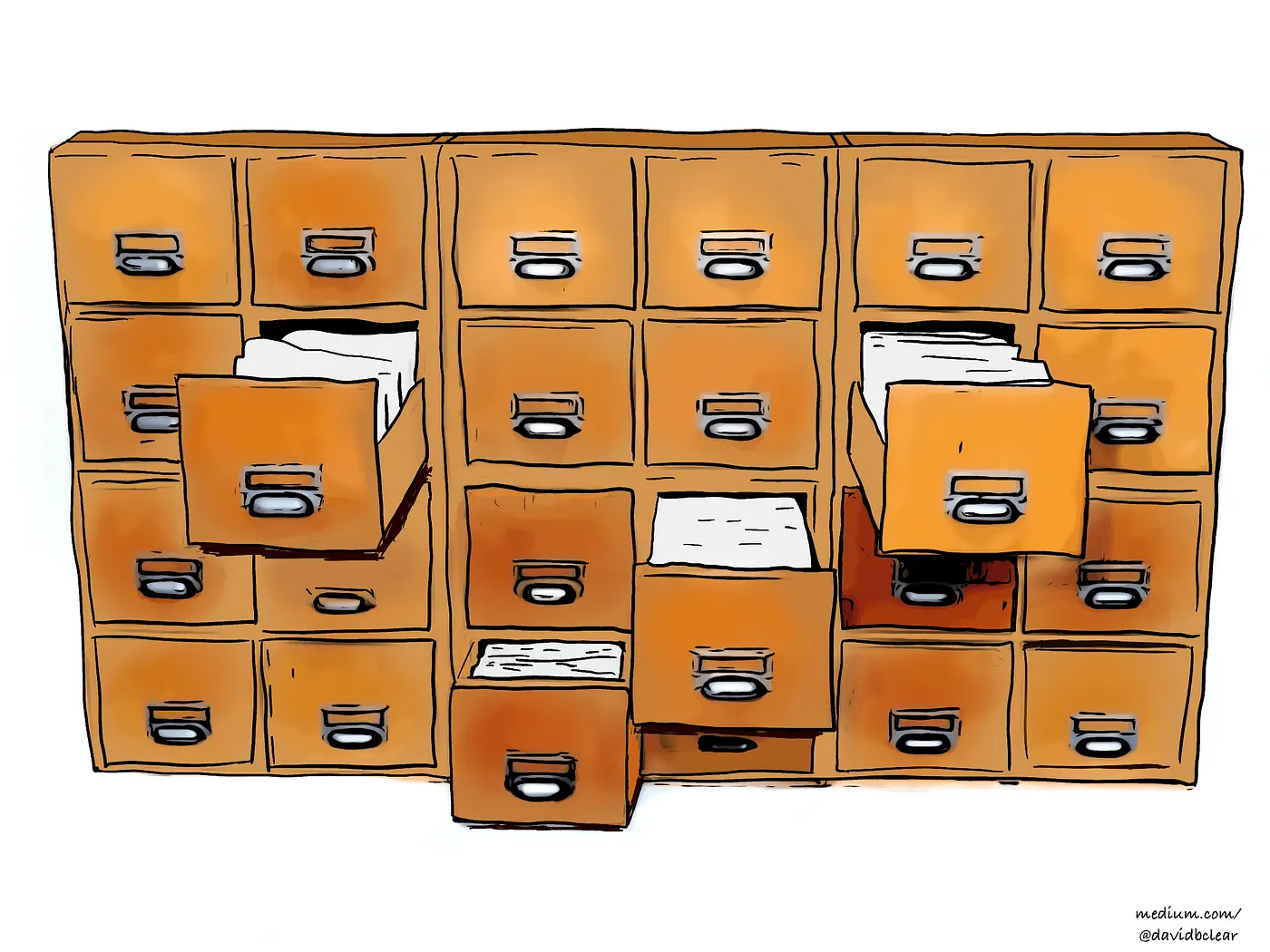
> A bit anticlimactic, isn’t it?
> A piece of furniture? That’s what made him so productive?
> Well, not exactly. It’s like me handing a pencil to a Neanderthal and the Neanderthal asking “That’s it? This little stick is what allows you to communicate through space and time with other human beings and remember things forever?”
> As you’ll see, the Zettelkasten method is as much about a piece of furniture as writing is about a little stick. But before we get to Luhmann’s method, let’s first review the drawbacks of some other notetaking systems.
## Why other notetaking systems fall short
> If you’re anything like me, you’ve tried taking notes in all sorts of ways.
> - You’ve written in paper notebooks,
> - you’ve written on the margins of books and printouts,
> - you’ve used smartphone and web apps,
> - you’ve taken notes using a word processor or text editor and tried to organize the resulting files in a sensible folder structure on your computer,
> - you’ve drawn both analog and digital [mind maps](https://en.wikipedia.org/wiki/Mind_map) and [concept maps](https://en.wikipedia.org/wiki/Concept_map),
> - you’ve used [outliners](https://en.wikipedia.org/wiki/Outliner), and
> - you’ve buried your desk under a chaos of post-it notes and random slips of paper.
^tried-everything
> The problem with all these approaches is that they don’t really help you [[Wisdom|find connections among ideas]]. Instead, they lock ideas away to be forgotten in a box under your bed, in the cloud, or in a folder somewhere on your [[computer]].
^no-connections
> Imagine you’ve read a popular science book three years ago, a book about personal finance one year ago, and now you just read a blog post about how to be more productive. Each of these sources has ideas and these ideas might be connected in some way. Moreover, six months ago you might have had some clever idea of your own that might be related as well. Yet, you’re unable to see any connections among these ideas. Why? Probably because you didn’t take any notes. But even if you had, you’d still be unable to see any connections.
> If you wrote notes into paper notebooks, you’ve fixed them into a rigid chronological order. The ideas are stuck to the pages as if you had poured concrete over them. If there is a connection between an idea at the bottom of page 17 and an idea at the top of page 89, you’re not going to see that connection. You’ve got the same problem if you wrote your notes in the margins of books and printouts.
^concrete
> The usual digital notetaking approaches don’t fare any better. Tools like Evernote quickly devolve into dumping grounds as you succumb to the [collector’s fallacy](https://zettelkasten.de/posts/collectors-fallacy/) — the tendency to collect heaps of information without ever doing anything useful with it. If instead you keep your notes in files and folders on your computer, they’ll also soon end up forgotten and collecting digital dust. And even if you don’t forget your notes, they are still not organized in a way that lets you easily see connections between ideas.
^collectors-fallacy
> If we now consider mind maps, concept maps, and outlines, we’re getting closer to a solution. These tools are a good approach to find relations among ideas. The problem, however, is that they only allow you to properly work with a few dozen ideas. ==You’re certainly not going to put 90,000 ideas into a single concept map over the time span of 40 years and draw connections among the ideas.== But [that’s precisely what Luhmann did with his Zettelkasten](https://sociologica.unibo.it/article/view/8350/8270)!
^mind-maps
- What made Luhmann’s approach unique?
- [[Steps of notes managements]]
## The Zettelkasten’s massive advantage
> By using the Zettelkasten method, your notes become entities that are knitted into a larger web of ideas. Instead of the system deteriorating the more you add to it, it becomes better. Again, it’s like your brain. No one would suggest that having more neurons would make you dumber. It’s the same with the Zettelkasten. More notes means more ideas and more connections, and the more ideas and connections you have, the “smarter” your Zettelkasten becomes and the more insightful your writing will be.
^gets-better
> Saying that the Zettelkasten becomes smarter is not just poetic language. Luhmann meant that quite literally.
> Let me explain.
> [Claude Shannon](https://en.wikipedia.org/wiki/Claude_Shannon), the father of information theory, studied communication and needed some measure for the amount of information that is exchanged when two entities communicate. The measure he came up with is called [surprisal](https://en.wikipedia.org/wiki/Information_content) (also known as information content, Shannon information, or self-information). ==Shannon realized that how much information is contained in a message is determined by how surprising the message is.==
> Wait, what? More surprising means more information? That’s exactly right.
> Imagine you ask a duck a question and it answers “quack”. You then ask the duck another question, and it answers “quack” again. You ask it questions over and over, and that silly duck just keeps answering “quack”. You’d quickly realize that you’re not communicating. There’s no surprise ever. The duck is not conveying any information. It’s just saying “quack”. It just isn’t a smart conversation partner.
> Now compare that to a mature Zettelkasten, which contains thousands and thousands of ideas. You have a question and with that question in mind you dive into your Zettelkasten, moving from one idea to another by following links among notes. Since it contains so many ideas, which you’ve been collecting over a time span of years, you’ve forgotten a huge chunk of them. The Zettelkasten is bursting with ideas that you added years ago and no longer remember. Thus, if you explore it with a question in mind, the Zettelkasten will provide answers in surprising ways. In this sense, the Zettelkasten is smarter than a duck and it’s why [Luhmann described it as a conversation partner](https://luhmann.surge.sh/communicating-with-slip-boxes).
^surprisal
> Of course, to reap these benefits, the Zettelkasten must have reached a certain level of maturity. At the beginning it will just contain a few notes which you won’t find that surprising since you just added them recently. Over time, however, your Zettelkasten will grow from an apprentice to a full-fledged writing collaborator. Meanwhile, it will be at least as good a repository for your notes as a notebook or some fancy app. In fact, a Zettelkasten will probably already be a better notetaking system from the first day as the method has some further advantages.
## You’ll learn better
> Reading doesn’t magically increase your knowledge. Just because some text has entered your eyeballs and visited your short-term memory, that doesn’t mean you’ve learned from it. In fact, if all you’re doing is reading — and you’re doing so for any purpose other than entertainment — then you’re wasting your time. What has only entered your short-term memory will eventually be forgotten and is useless in the long term. Years later, it’ll be as if you had never read that book or that article.
> So if you’re reading to increase your knowledge, take notes. And if you’re going to take notes, use a Zettelkasten.
> A Zettelkasten will not only be a safe repository for the knowledge you accumulate over time, but, by forcing you to create notes and then links between those notes, [a Zettelkasten will improve your understanding of the reading material](https://zettelkasten.de/posts/extend-your-mind-and-memory-with-a-zettelkasten/).
^learn-better
> [As researchers Annie Piolat, Thierry Olive, and Ronald T. Kellogg put it](https://doi.org/10.1002/acp.1086) ([pdf](http://centrepsycle-amu.fr/wp-content/uploads/2014/01/POK2005-ApplCogPSy.pdf)):
>
> > ==*\[Lots of\] studies suggest that nearly all non-linear note-taking strategies (e.g. with an outline or a matrix framework) benefit learning outcomes more than does the linear recording of information, with graphs and concept maps especially fostering the selection and organization of information. As a consequence, the remembering of information is most effective with non-linear strategies.*==
^non-linear
> You get that? The linear recording of information, as in a notebook, sucks. Non-linear notetaking, and ==especially graphs and concept maps, rock==. And what is a Zettelkasten if not one massive graph or concept map?
## You’ll focus better
> ==This one is from personal experience. I noticed that using the Zettelkasten method allows me to concentrate much better while reading. I think this is because the method turns reading into a mission. I’m not just reading. I’m on a quest to hunt down ideas, extract them from texts, and feed them to my Zettelkasten as notes. I have a crystal clear goal: feed my Zettelkasten. I’m not just reading with some vague intention of becoming smarter. Having a clear goal makes reading much more fun and I always seem to quickly end up in a== ==[flow state](https://en.wikipedia.org/wiki/Flow_\(psychology\))====.==
^focus-better
## You’ll be less frustrated
> The Zettelkasten method makes reading complicated texts less frustrating. You’re not necessarily trying to understand the whole text. You’re just hunting down ideas to incorporate into your Zettelkasten. Who cares if you don’t understand everything? As long as you’re extracting some ideas, you’re growing your knowledge base and the text is being useful to you.
## You’ll waste less time
> With the Zettelkasten method, research is never a waste of time. You never have to worry about deciding whether some piece of information is worth storing in your Zettelkasten. If it’s interesting, add it, even if you’re unsure if it’ll be relevant to your current writing project.
> Remember, a Zettelkasten is intended to store knowledge for the rest of your life. If some piece of information ends up not being relevant now, it may turn out to be relevant eventually. You’re never wasting time by adding more ideas and connections. ==A Zettelkasten just keeps getting better the more ideas it contains.==
## You’ll think better
> ==As== ==[Don Norman](https://en.wikipedia.org/wiki/Don_Norman)== ==put it in his book== ==*Things that make us smart: Defending human attributes in the age of the machine*====, “The power of the unaided mind is highly overrated. Without external aids, memory, thought, and reasoning are all constrained. \[…\] The real powers come from devising external aids that enhance cognitive abilities.”==
> Luhmann, with his Zettelkasten method, seems to have stumbled upon just such an external aid. Not only did his Zettelkasten aid his memory by serving as a collection of ideas he could refer back to, but it also improved his thinking. That’s why he said “Without the \[Zettelkasten\] notes, that is, by only thinking, I wouldn’t come up with such ideas. Of course my head is necessary to write down the insights, but it can’t take all the credit” ([original in German](https://www.uni-bielefeld.de/soz/luhmann-archiv/pdf/jschmidt_zettelkasten-als-uberraschungsgenerator.pdf)).
> I think the Zettelkasten’s power as a thinking aid is explained by three main factors.
> First, using the Zettelkasten method forces you to write. In particular, according to the method you have to write notes using your own words to ensure that you’ll understand them in the future. And as anyone who’s done any writing knows, writing things down forces you to turn vague notions into clearer thoughts.
>
> Second, whenever you add a new note, the Zettelkasten method forces you to look for already existing notes you can link to. That broadens your thinking by forcing you to consider how new ideas relate to others you’ve encountered before.
>
> Third, a Zettelkasten can store a train of thought. A train of thought is nothing but a sequence of ideas and a Zettelkasten is all about linking ideas. Thus, you can have a ==train of thought== today, store it in your Zettelkasten as a sequence of interlinked notes, and then, anytime in the future, you can continue that train of thought by adding new notes and linking them to the previous ones.
^think-better
## You’ll be more productive
> The Zettelkasten method gives you a systematic way to research information, structure your knowledge, and develop your thinking. It gives you a process to follow that ultimately ends up generating new ideas. This has two advantages.
> First, having a process to follow automates how to proceed at a given task, eliminating the need to think too much about what to do next. This makes you more efficient and thus more productive.
^more-productive
> Second, the number of new ideas is one of the most important measures of productivity for any nonfiction writer. By being a systematic way of generating new ideas, the Zettelkasten method directly affects the output that matters: the number of new ideas to write about.
## You’ll be more creative
> A Zettelkasten is designed to find connections between any past idea you’ve recorded and any present or future ideas you’ll record. This makes a Zettelkasten into a tremendous tool for creativity. After all, creativity is nothing more than connecting ideas. All novel ideas are based on previous ones. A piano plus writing is a typewriter, a telephone plus a printer is a fax machine, the idea of an office desk with files and folders combined with a television screen and a computer is a computer’s graphical desktop interface. [Every novel idea is a remix](https://www.youtube.com/watch?v=nJPERZDfyWc) and a Zettelkasten’s explicit purpose is to remix ideas.
^more-creative
## The Zettelkasten principles
- [[Notes management principles]]
## How to implement a Zettelkasten
> If you followed along this far, maybe you’re already excited to start your own Zettelkasten. If so, I have good news. You can start right now. You don’t need to buy some expensive software or, God forbid, a big clunky set of wooden drawers like [Luhmann’s original Zettelkasten](https://twitter.com/LuhmannArchiv/status/639734971842830336).
## Paper-based solution
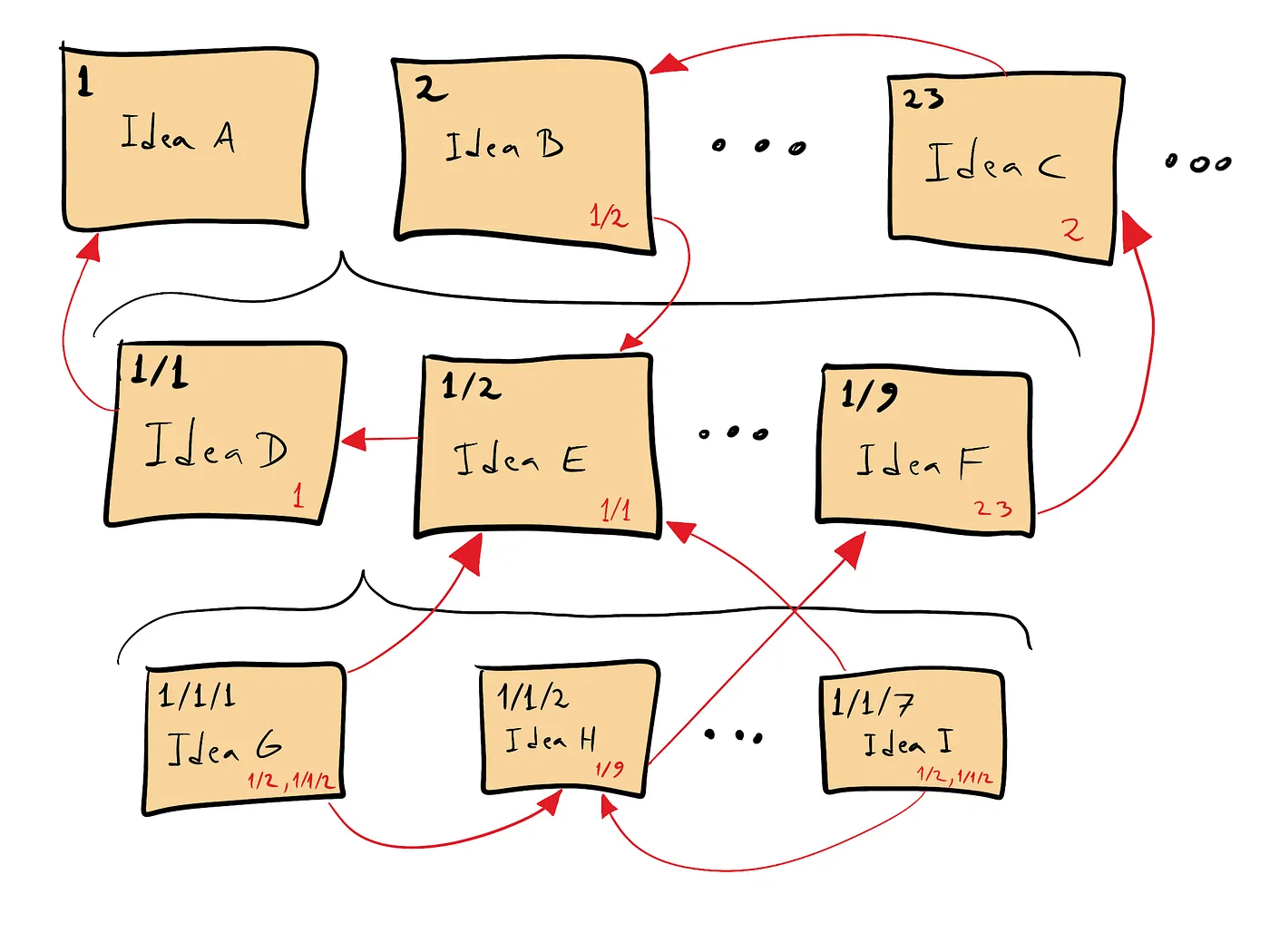
> If you want to go old school and implement a paper-based solution, all you got to do is get a shoebox or similar container and a set of index cards or paper that you’ve cut up into appropriate sizes. Then start reading or thinking and each time you stumble across a new idea you want to keep track of, write it down on a separate index card. In one corner of the index card, add a unique identifier. Luhmann kept it simple and simply enumerated all his cards. If you want to follow that approach, then the first card you create would have the number 1, the second card would have the number 2, and so forth:
^paper-based
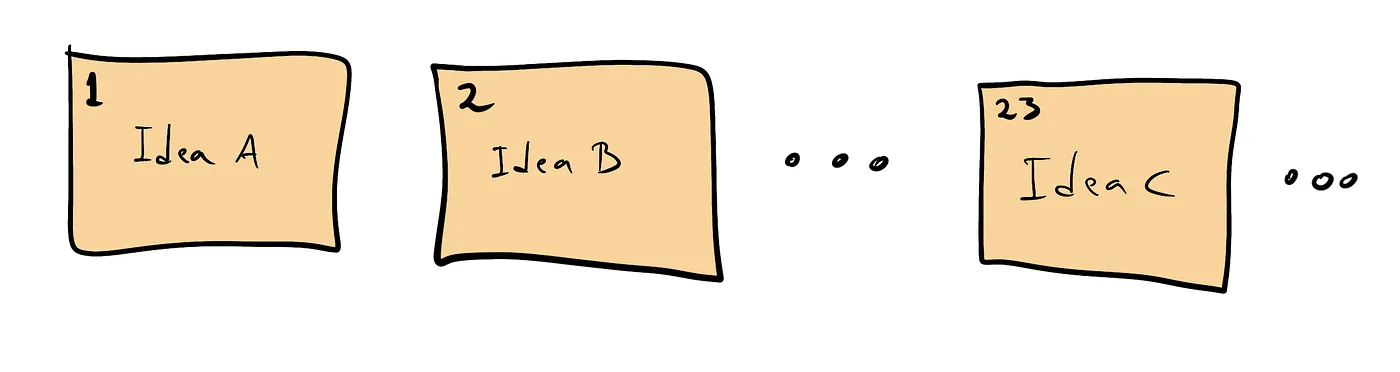
Image courtesy of the author ( CC BY-SA 4.0 )
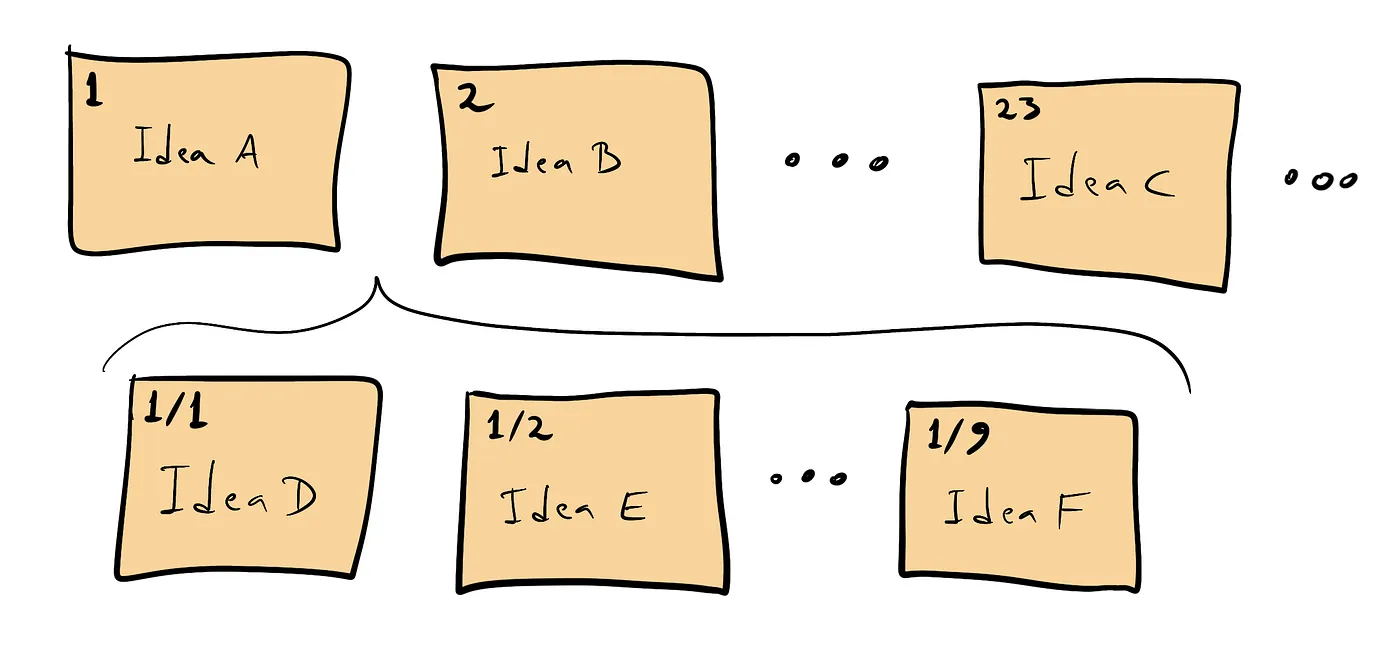
> If at a later time you want to insert a bunch of new cards between the one numbered 1 and the one numbered 2, just place the new cards in between, giving them as identifiers 1/1, 1/2, 1/3, and so forth:
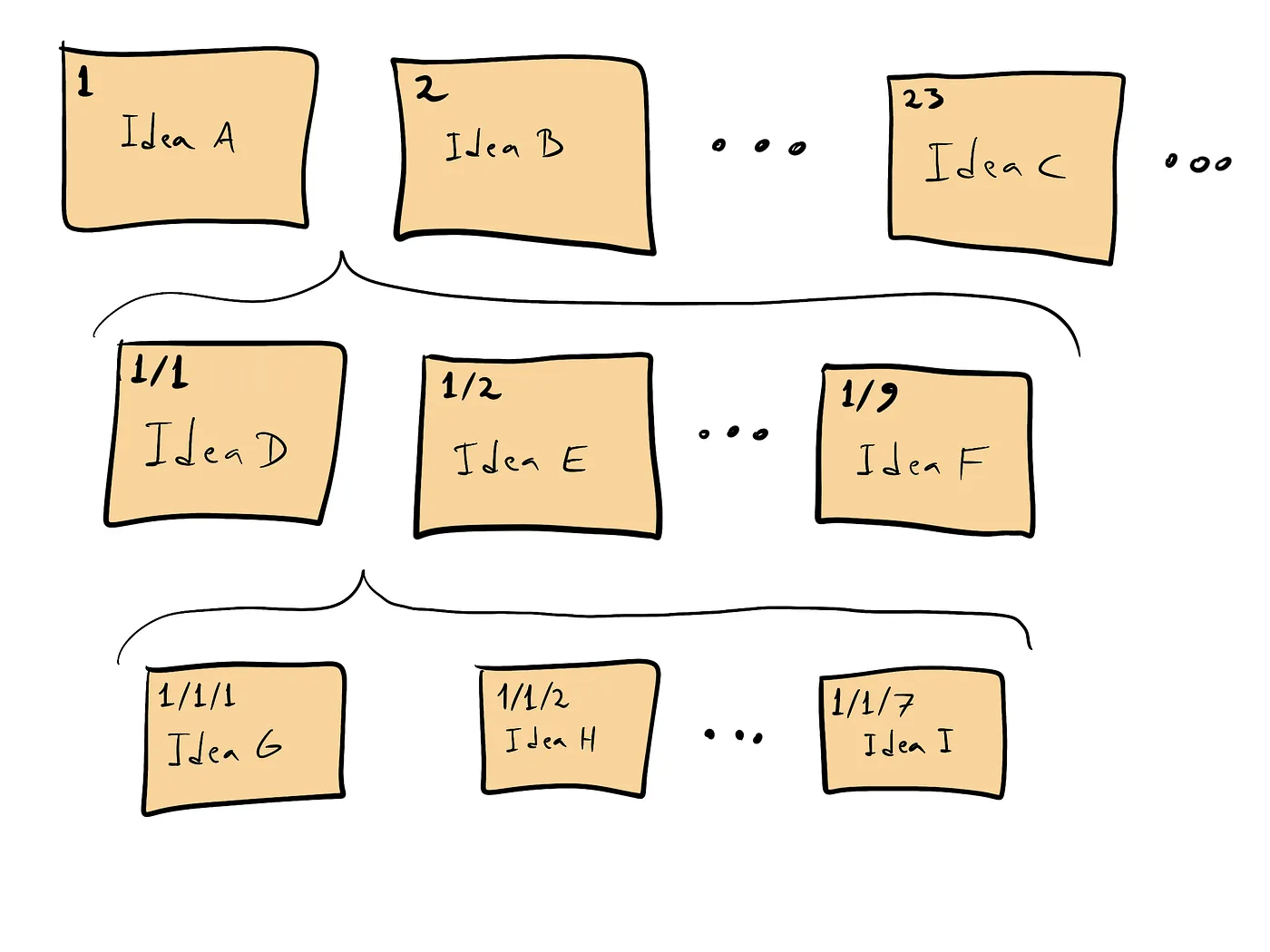
> By adding a further slash, you can add additional cards between the newly created cards. For instance, to insert new cards between those numbered 1/1 and 1/2, label the new ones as 1/1/1, 1/1/2, 1/1/3, and so forth:
> Now, to create links between two cards you simply use the identifiers. For instance, if you want to create a link from the card 1/1 to the card 1, simply write the number 1 somewhere on card 1/1. Similarly, if you want to create a link from card 23 to card 2, write 2 somewhere on card 23. By proceeding in this way, you can link your cards as you please:
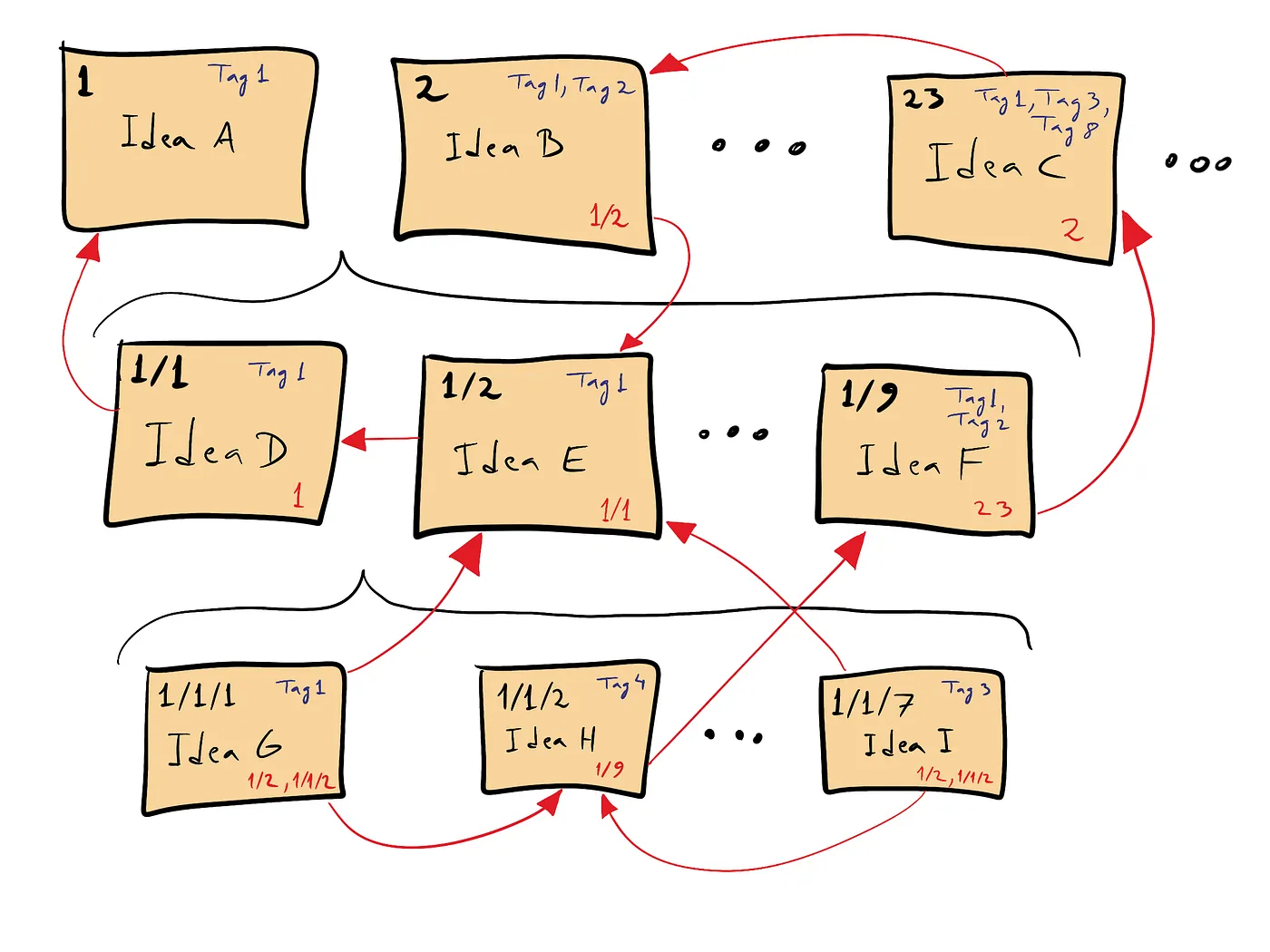
> If you want to add tags to your cards, simply write them on the cards themselves:
> And to make it easier for yourself to find cards with a particular tag, create another note where you list all the tags you’ve used, with each tag followed by a list of identifiers corresponding to notes that match the given tag:
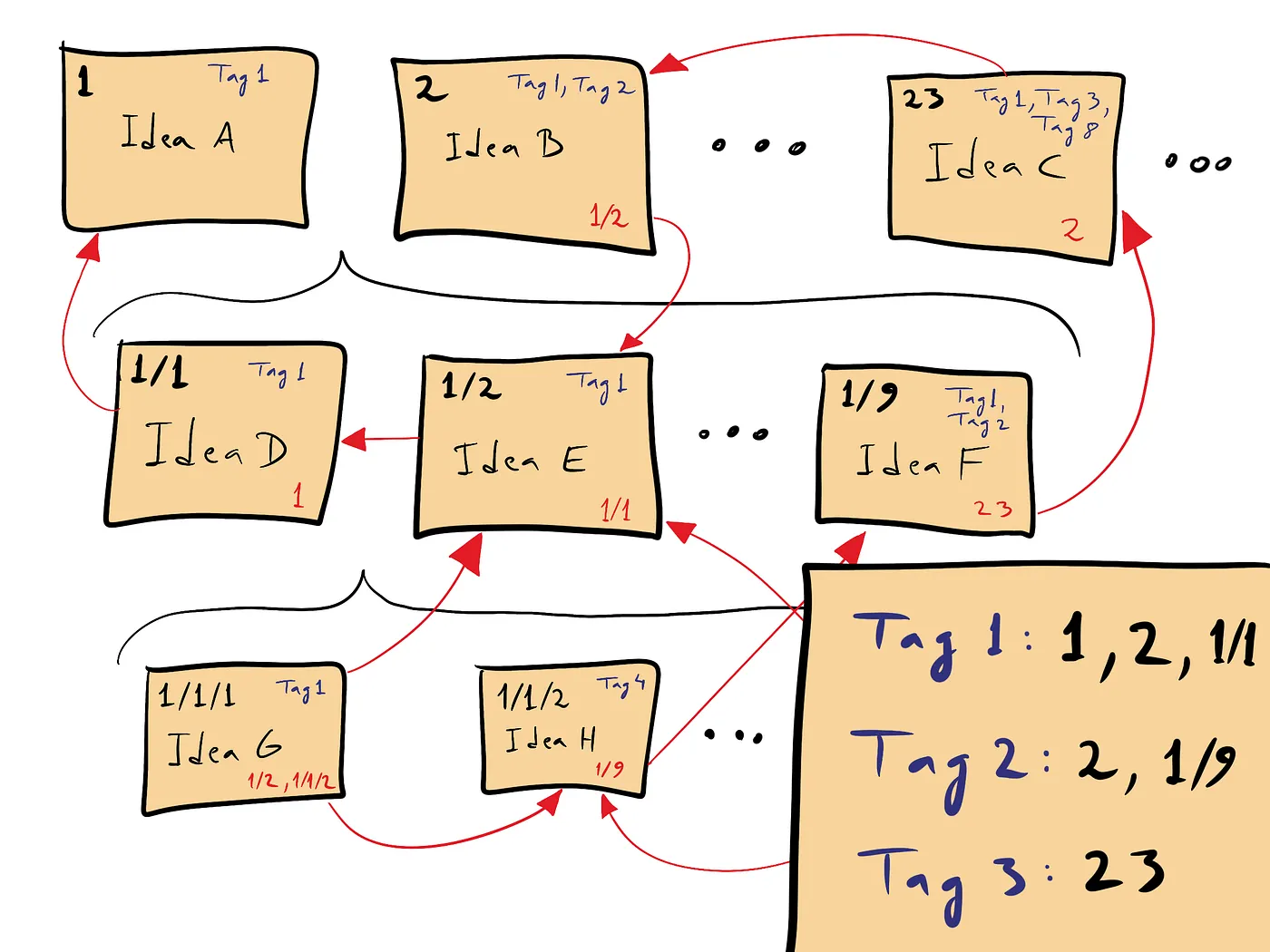
> And that’s it! That’s a basic implementation of the Zettelkasten method using just paper index cards. ==Luhmann did essentially this, although he used an alphanumeric numbering system to identify his cards as he found a combination of numbers and letters easier to work with==. If you’re curious, you can browse his cards [here](https://niklas-luhmann-archiv.de/bestand/zettelkasten/inhaltsuebersicht) (although note that the cards are in German as that’s the language he wrote in).
## Digital solutions
> If you want to go digital, you have several options. You can use an app like [Roam Research](https://roamresearch.com/), [Zettlr](https://docs.zettlr.com/en/guides/guide-zettelkasten/), [Evernote](https://x-team.com/blog/a-system-to-capture-and-retain-knowledge/), [1Writer](https://zettelkasten.de/posts/1writer-note-archive-ipad-iphone/), [iA Writer](https://trms.me/knowledge-management-with-zettelkasten-and-ia-writer/), or any of the apps listed at [zettelkasten.de](https://zettelkasten.de/tools/). You can also use a [personal wiki](https://hackmake.org/2015/03/your-knowledge-base-wiki), plugins for text editors such as [vim](https://github.com/michal-h21/vim-zettel) and [sublime](https://github.com/renerocksai/sublime_zk), or go for a combination of analog and digital where [you write your notes on paper and then scan them](https://github.com/crelder/zettelkasten/wiki).
> ==Since a Zettelkasten is supposed to be used for a lifetime, I would definitely go with something that’s future proof and doesn’t have any vendor lock-in. I personally chose a plain text solution.==
^future-proof
> My Zettelkasten is a folder in [Dropbox](https://www.dropbox.com/). This allows me to access my Zettelkasten from my computer, my phone, or any web browser. Each note is a separate text file kept within that folder. There are no subfolders. Everything is kept flat.
> Whenever I create a new note, I create a new text file, whose filename is given by a timestamp followed by a title, as [advocated by Christian from zettelkasten.de](https://zettelkasten.de/posts/add-identity/). For instance, right now it’s 16 December 2019 and the time is 13:52h. So if I were to create a note titled “Zettelkasten is amazing”, it would become a new text file named `201912161352-Zettelkasten-is-amazing.txt`.
> I then write the contents of the note using a combination of [markdown](https://en.wikipedia.org/wiki/Markdown) and wiki-style double-bracket links. So the file `201912161352-Zettelkasten-is-amazing.txt` might contain the following:
```hs
# 201912161352 Zettelkasten is amazing
#notetaking #writing #productivityThe Zettelkasten notetaking system is the best notetaking system ever.## Links
- [[201912070830-Zettelkasten-principles]]
- [[201912080935-Niklas-Luhmann-short-biography]]
```
> The first line is the title of the note, the second line is a list of three hashtags, the next line is the idea I’ve written down, and the last two lines are links to two files: `201912070830-Zettelkasten-principles.txt` and `201912080935-Niklas-Luhmann-short-biography.txt`. Since the file is just plain text, it can be opened with any text editor on essentially any computer, phone, or tablet. That makes it future proof and independent of any particular application. But if you have a nice text editor that supports markdown and wiki-style double-bracket links, you can see your note nicely formatted. For instance, with [1Writer](https://zettelkasten.de/posts/1writer-note-archive-ipad-iphone/) for iPad, the note looks like this:
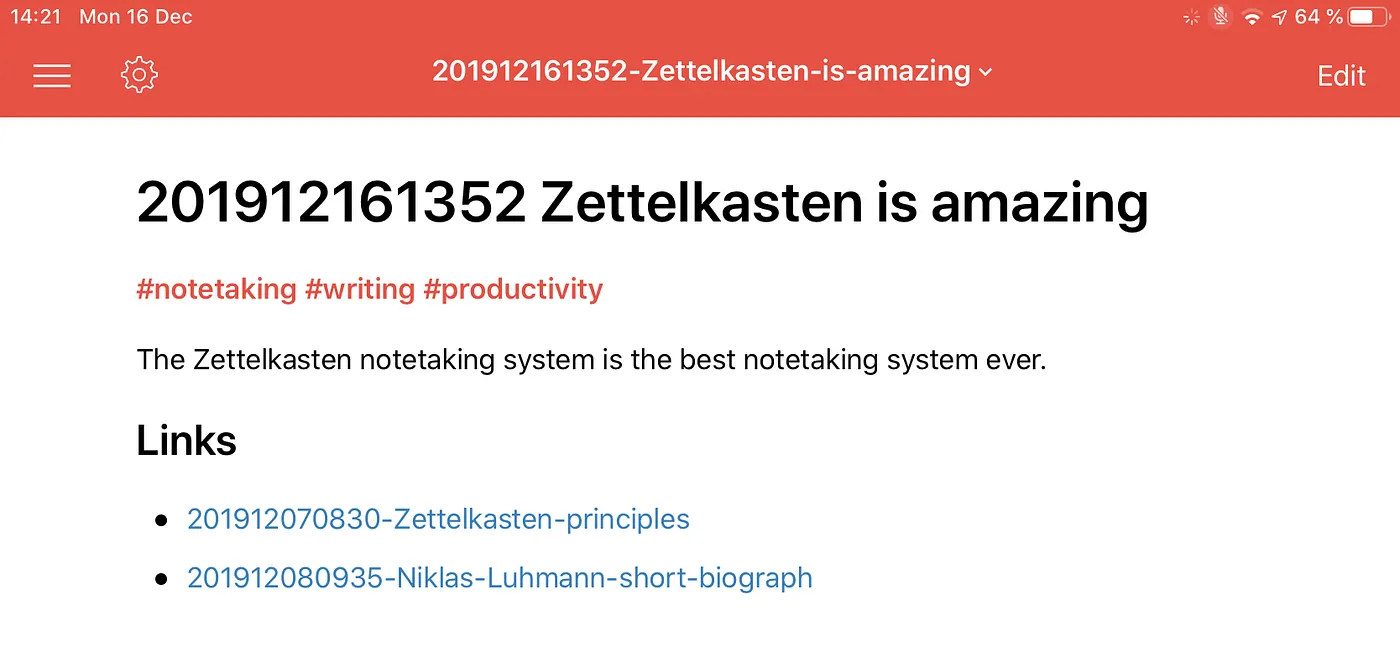
Screenshot taken by the author
> Tapping on one of the blue links, opens the appropriate file. This makes it very convenient to browse the Zettelkasten. However, I could just as well use another text editor that supports markdown and wiki-style links or even use one that doesn’t support these features. In the latter case I would just select the text between double brackets, press `ctrl c` to copy the name of the file I want to open, and then just press `ctrl v` to paste the filename into whatever tool I want to use to open the text file.
## Wrapping up
> Luhmann’s Zettelkasten differs from other notetaking systems. Instead of being intended only as an aid for the next writing project, [the method is designed to help you with a lifetime of thinking, writing, and publishing](http://takingnotenow.blogspot.com/2007/12/luhmanns-zettelkasten.html). It’s designed to accommodate as many notes as you want without turning into an unworkable mess. And it’s main purpose is to find connections among seemingly unconnected ideas.
> Because of this, Luhmann rejected organizing his notes in a merely linear way or according to fixed categories. Instead, ==he organized his notes as a network of ideas that grows organically.==
> As you apply the method yourself, you’ll come across ideas that are glued to books, notebooks, web pages, newspapers, and other sources. With the Zettelkasten method it’s your job to liberate those ideas from their sources and turn them into notes that live in your central repository — in your Zettelkasten — where they are then linked to other notes. Essentially, you’re creating a collection of ideas where there are no boundaries between types of ideas and no boundaries between old and new ideas. Every idea can [easily intermingle](https://www.ted.com/talks/matt_ridley_when_ideas_have_sex/up-next) with any other to give rise to new ideas. That clearly distinguishes it from other notetaking methods based on notebooks, folders, or tags.
> So if you care about remembering the ideas you encounter, if you care about how ideas relate to each other, and if you care about having ideas of your own, try the Zettelkasten method. It’s been specifically designed to manage ideas at a large scale and it made Luhmann one hell of a prolific writer.